Showing posts with label Counter. Show all posts

Monday, 24 December 2018

Pass Parameters from JMeter Maven Plugin

To pass parameters from Maven project using JMeter Maven plugin, please make sure you have Maven project created and  udated JMX placed at src/test/jmeter source folder. If not please first setup your project Running JMeter Script from Eclipse in Maven project

Parameterize JMeter Script


Update JMeter Script


  • Please make sure that you have created variables in the script as shown in below example.This example uses Number of Threads, Ramp-Up Period and Duration as variables for reference. Default value is  set as 1 for each variable Number of Threads, Ramp-Up Period and Duration.

Import JMeter Script


  • Import the Parameterized script (.jmx) in eclipse under src/test/jmeter


Update POM.xml


  • Add Parameters Configuration in POM.xml

<configuration>
    <testResultsTimestamp>false</testResultsTimestamp>
    <propertiesUser>
        <threads>${threadCount}</threads>
        <rampup>${rampupTime}</rampup>
        <duration>${durationSecond}</duration>
    </propertiesUser>
</configuration>
  

  • Complete POM.xml will look like this

<project
    xmlns="http://maven.apache.org/POM/4.0.0"
    xmlns:xsi="http://www.w3.org/2001/XMLSchema-instance"
 xsi:schemaLocation="http://maven.apache.org/POM/4.0.0 http://maven.apache.org/xsd/maven-4.0.0.xsd">
    <modelVersion>4.0.0</modelVersion>
    <groupId>example</groupId>
    <artifactId>example</artifactId>
    <version>0.0.1-SNAPSHOT</version>
    <packaging>jar</packaging>
    <name>example</name>
    <url>http://maven.apache.org</url>
    <properties>
        <project.build.sourceEncoding>UTF-8</project.build.sourceEncoding>
    </properties>
    <dependencies>
        <dependency>
            <groupId>junit</groupId>
            <artifactId>junit</artifactId>
            <version>3.8.1</version>
            <scope>test</scope>
        </dependency>
    </dependencies>
    <build>
        <plugins>
            <plugin>
                <groupId>com.lazerycode.jmeter</groupId>
                <artifactId>jmeter-maven-plugin</artifactId>
                <version>2.1.0</version>
                <configuration>
                    <testResultsTimestamp>false</testResultsTimestamp>
                    <propertiesUser>
                        <threads>${threadCount}</threads>
                        <rampup>${rampupTime}</rampup>
                        <duration>${durationSecond}</duration>
                    </propertiesUser>
                </configuration>
                <executions>
                    <execution>
                        <id>jmeter-tests</id>
                        <phase>verify</phase>
                        <goals>
                            <goal>jmeter</goal>
                        </goals>
                    </execution>
                </executions>
            </plugin>
        </plugins>
    </build>
</project> 

Script Execution


  • Pass values as command line parameters 

mvn verify -DthreadCount=20 -DrampupTime=5 -DdurationSecond=60


Running JMeter Script from Eclipse in Maven project

We can run JMeter Script from Eclipse in 4 simple steps:

  1. Create a simple Maven project in eclipse
  2. Import JMeter Script(.jmx) file in eclipse
  3. Add jmeter-maven-plugin to pom.xml
  4. Script Execution

Eclipse + Maven Project


  • Go to File > New > Project 


  • Select Wizard > select Maven Project


  • Select project name and location wizard > Keep selected use default work-space location > Click Next


  • Select an Archetype > simply Click Next

  • Specify Archetype parameters wizard > Please enter GroupId, Artifact Id  > Click Finish

  • Your Maven Project is successfully created, project hierarchy will look like this


Import JMeter Script in Eclipse


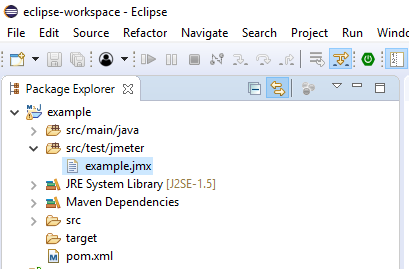
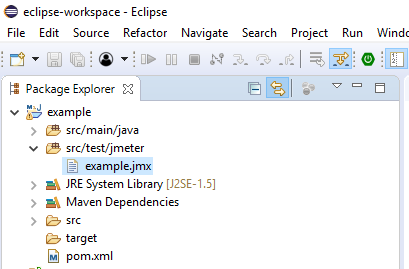
  • To import and execute JMeter script in eclipse, first we need to rename the src/test/java source folder to src/test/jmeter. After renaming project hierarchy will look like this


  • Place the JMeter script to src/test/jmeter source folder as shown 


Add JMeter Maven plugin to POM

  • Add below JMeter Maven plugin to pom.xml
<build>
    <plugins>
        <plugin>
            <groupId>com.lazerycode.jmeter</groupId>
            <artifactId>jmeter-maven-plugin</artifactId>
            <version>2.1.0</version>
            <executions>
                <execution>
                    <id>jmeter-tests</id>
                    <phase>verify</phase>
                    <goals>
                        <goal>jmeter</goal>
                    </goals>
                </execution>
            </executions>
        </plugin>
    </plugins>
</build>

  •  Complete pom.xml will look like this

<project
    xmlns="http://maven.apache.org/POM/4.0.0"
    xmlns:xsi="http://www.w3.org/2001/XMLSchema-instance"
 xsi:schemaLocation="http://maven.apache.org/POM/4.0.0 http://maven.apache.org/xsd/maven-4.0.0.xsd">
    <modelVersion>4.0.0</modelVersion>
    <groupId>example</groupId>
    <artifactId>example</artifactId>
    <version>0.0.1-SNAPSHOT</version>
    <packaging>jar</packaging>
    <name>example</name>
    <url>http://maven.apache.org</url>
    <properties>
        <project.build.sourceEncoding>UTF-8</project.build.sourceEncoding>
    </properties>
    <dependencies>
        <dependency>
            <groupId>junit</groupId>
            <artifactId>junit</artifactId>
            <version>3.8.1</version>
            <scope>test</scope>
        </dependency>
    </dependencies>
    <build>
        <plugins>
            <plugin>
                <groupId>com.lazerycode.jmeter</groupId>
                <artifactId>jmeter-maven-plugin</artifactId>
                <version>2.1.0</version>
                <executions>
                    <execution>
                        <id>jmeter-tests</id>
                        <phase>verify</phase>
                        <goals>
                            <goal>jmeter</goal>
                        </goals>
                    </execution>
                </executions>
            </plugin>
        </plugins>
    </build>
</project>

Script Execution


  • To run JMeter script please use below commands

mvn clean install

  • You can also specify target defined in pom.xml 
mvn clean verify


Wednesday, 7 May 2014

Loop Controller and Counter in JMeter

By the end of this post you will be able to add a Loop Controller and Counter to your script which will loop a request n no of times.

Loop Controller
Loop Controller is a Logic Controller which determines the order in which Samplers are processed.You can use Loop Controller, if you want to loop a request/logic a certain number of times in addition to the loop value specified for the Thread Group.

Counter
Counter can be used anywhere in the Thread Group. User can set a start point, maximum value of counter and the increment using counter config.Counter will start from start point and reach the maximum value and then reset back to the start value, it will continue like that until the test is ended.

Example:
We will loop a request 10 times using Loop Controller. And we will set Counter values start with 1, Increment by 1 and reach Maximum 10.
So JMeter will send 10 request with counter values 1 to 10 as shown below in results.
Please follow below steps to add loop Controller and counter.

Add Components:
  1. Add Loop Controller to Thread Group
    Right click on Thread Group > Add > Logic Controller > add Loop Controller.


  2. Add Counter to Loop Controller
    Right click on Loop Controller > Add > Config Element > add Counter


  3. Add HTTP Request Sampler to Loop Controller
    Right click on Thread Group > Add > Sampler > HTTP Request


  4. Add View Results Tree to Thread Group
    Right click on Thread Group > Add > Listener > add View Results Tree


Loop Controller:
Using Loop Controller, JMeter will loop through a certain number of times, in addition to the loop value you specified for the Thread Group.
Set Loop counters value to 10


Counter:
The counter configuration lets the user configure a starting point, a maximum, and the increment. The counter will loop from the start to the max, and then start over with the start, continuing on like that until the test is ended.
Set Values:

Start: 1, Increment: 1, Maximum: 10, Format: 00, Reference Name: Count


Note: If the counter exceeds the maximum, then it is reset to the Start value. If your loop count is 10 and maximum value is 5, then you will get output 1,2,3,4,5,1,2,3,4,5

HTTP Request Sampler:
Change request name to say: Counter value - ${Count}
Set Server Name: google.com


Save and Run Script:
Save the above script and Select "View Results Tree" and click on "Start"


Results: